Hand Drawn Infographics Elements: A Practical Design Guide
In a digital landscape saturated with polished, corporate aesthetics, authenticity has become a premium currency. Hand drawn infographics elements offer a unique solution to the problem of visual fatigue. These are not merely decorative doodles; they are functional design assets that bridge the gap between complex data and human connection. When we talk about these elements, we are referring to a library of sketched arrows, banners, charts, icons, and connectors that mimic the imperfection and warmth of traditional pen-on-paper illustration. For creators ranging from small business owners to educators, these assets provide an immediate way to soften technical content and make information feel more accessible and less intimidating.
The Human Touch in Data Visualization
The primary value of incorporating hand drawn styles into information design lies in psychological approachability. Standard vector graphics often signal formality and rigidity. While appropriate for financial reports or legal documents, this aesthetic can create distance when trying to engage a casual audience or explain a creative concept. Sketched elements trigger a different cognitive response. They suggest that a human being was involved in the creation process, which builds trust and lowers the barrier to entry for the viewer.
This style is particularly effective for storytelling. When you use a rough, marker-style arrow to connect two ideas, it implies a narrative flow rather than a strict logical dependency. It tells the audience that the information is part of a journey. For bloggers and marketers, this distinction is crucial. You are often competing for attention against highly produced media; a hand-drawn aesthetic can act as a visual pattern interrupt that feels personal and bespoke, even when utilizing pre-made asset packs.
Navigating File Formats: PNG, AI, EPS, and PDF
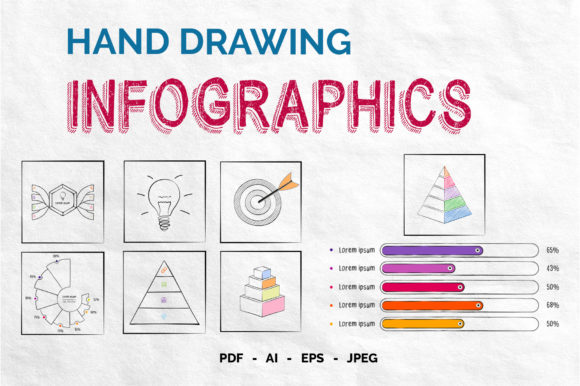
Understanding the technical delivery of these assets is just as important as understanding their aesthetic value. Most comprehensive packs of hand drawn infographics elements come in multiple formats, specifically PNG, AI, EPS, and PDF. Knowing which one to use will save you significant time and frustration during your workflow.
- PNG (Portable Network Graphics): This is the most beginner-friendly format. These files usually feature transparent backgrounds, allowing you to drag and drop them directly onto photos, colored slides, or web pages without needing advanced editing software. They are raster-based, meaning they are made of pixels. While excellent for quick social media posts or PowerPoint presentations, they can lose quality if scaled up significantly.
- AI (Adobe Illustrator) and EPS (Encapsulated PostScript): These are vector formats essential for professional designers and print work. Because they are mathematically defined rather than pixel-based, you can resize a hand-drawn banner to the size of a billboard without any loss of clarity. More importantly, these files allow for customization. You can change the stroke color to match your brand palette, adjust line thickness, or combine separate sketch elements into new compositions.
- PDF (Portable Document Format): Often overlooked in design contexts, vector PDFs serve as a versatile middle ground. They maintain scalability like AI files but can be opened in free viewers or imported into various layout programs without requiring an Adobe subscription. This makes them ideal for freelancers or educators who need high-quality print materials but lack enterprise-level software.
Practical Applications Across Industries
The versatility of these elements extends far beyond artistic projects. Their utility is grounded in communication efficiency. Consider the educator creating lesson plans for students with diverse learning needs. Dense text blocks can cause cognitive overload. By breaking down a historical timeline using sketched connectors and hand-lettered headers, the teacher creates visual anchors that aid memory retention. The informal style also reduces test anxiety, making study materials feel more like helpful notes than rigid examinations.
In the business sector, entrepreneurs and startups frequently utilize these assets for pitch decks and internal workshops. A startup explaining a disruptive technology might find that sleek, futuristic graphics feel premature or impersonal. Hand drawn diagrams can convey agility, creativity, and a "garage innovation" spirit that resonates with early-stage investors. Similarly, HR departments use these elements for onboarding documents to make company policies feel welcoming rather than bureaucratic. A sketched checklist for new hires feels like guidance from a mentor, whereas a standard table feels like compliance.
For digital content creators, these elements are invaluable for YouTube thumbnails, podcast cover art, and Instagram carousels. In these spaces, readability at small sizes is paramount. The bold, uneven lines of hand drawn typography and icons often remain legible on mobile screens where thin, precise vector lines might disappear. Furthermore, because these assets have a distinct texture, they help establish a consistent visual brand identity that stands out in crowded feeds.
Key Considerations Before Implementation
While the appeal of the hand drawn aesthetic is strong, successful implementation requires intentionality. One common pitfall is inconsistency. Hand drawn infographics elements rely on a specific illusion of spontaneity. If you mix three different sketch styles—for example, combining delicate pencil shading with bold marker strokes and watercolor splashes—the result can look chaotic rather than curated. Before downloading or purchasing a pack, audit the collection to ensure the line weight, texture, and level of detail are uniform across all assets.
Licensing is another critical factor that demands attention. Just because an element looks like a casual doodle does not mean it is free for commercial use. Always verify the license terms regarding attribution, modification rights, and usage limits. Some licenses permit use in client work but prohibit reselling the elements as part of a template kit. Understanding these boundaries protects your business from legal issues and respects the original artist's labor.
You should also consider the balance between decoration and function. It is easy to get carried away with charming illustrations, but infographics must prioritize information transfer. Every hand drawn element should serve a purpose: directing the eye, grouping related content, or emphasizing a key statistic. If a sketched flourish obscures text or distracts from the main message, it is counterproductive. Use white space generously to let the organic shapes breathe. The goal is to enhance clarity through warmth, not to replace structure with whimsy.
Finally, think about accessibility. Hand drawn fonts and textures can sometimes pose challenges for screen readers or users with visual impairments. Ensure that any text embedded within these graphical elements is also provided as alt-text or live HTML text. Maintain sufficient contrast between the sketch lines and the background. Authenticity in design should never come at the cost of inclusivity. When used thoughtfully, hand drawn infographics elements do more than decorate; they democratize information by making it feel universally understandable and inherently human.